How to add ChatGPT to ASP.NET Core is what most .NET teams search when the boss asks for a copilot. Tutorials show a controller that waits on the OpenAI API. That works in a sample. On a real ChatGPT ASP.NET application, that wait freezes the page and burns server threads.
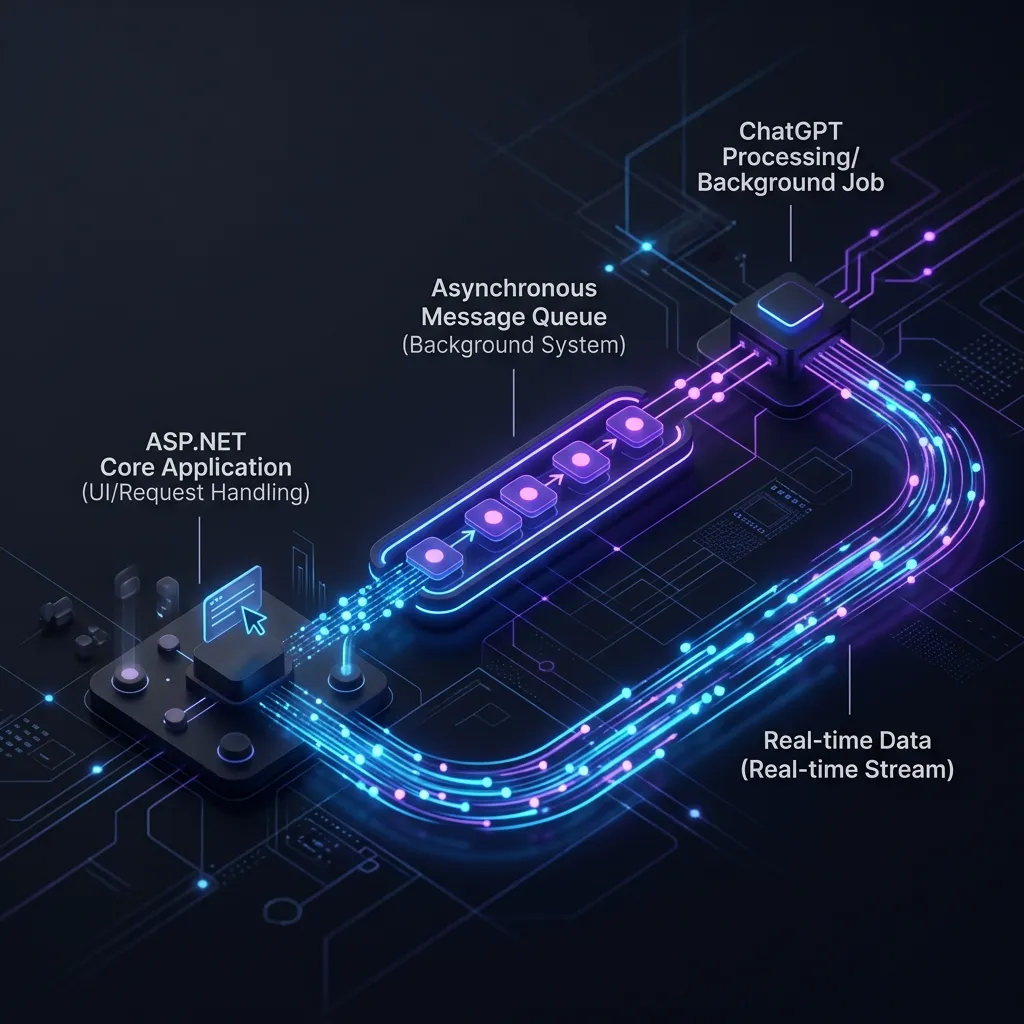
This post shows a production pattern: the web request returns immediately, a worker talks to OpenAI, and the UI updates over SignalR. If you add AI to ASP.NET Zero, the same idea sits behind AppServices and the permission checks you already have.
What You Will Learn
- Why calling ChatGPT inside the HTTP request is a trap
- How to add an AI chatbot ASP.NET Core flow with a job ID
- How tools stay inside ASP.NET Zero permissions
- FAQ from the queries people actually type
What “Add ChatGPT” Should Mean in a Real App
How to add ChatGPT to ASP.NET Core is not “paste an API key in a controller.” It means:
- The user is logged in.
- The model only sees that user’s (and that tenant’s) data.
- Anything the model wants to change goes through the same code a button click would use.
- The browser is not stuck on a spinner for eight seconds.
Live guides such as C# Corner and dotnet4techies show the first API call. Production ASP.NET Zero apps need the rest.
The Mistake: Waiting on OpenAI in the AppService
If you await the model inside an AppService that Angular calls, two things happen:
- IIS / Kestrel threads sit idle while tokens stream.
- Users think the app is down.
OpenAI ASP.NET Core samples often skip this because they are single-user demos.
Pattern: AppService Starts the Job, Worker Talks to ChatGPT
Your AppService should:
- Check the DTO and
[AbpAuthorize] as you do today.
- Queue a job with
TenantId, UserId, and a correlation ID.
- Return a job token immediately.
A Hangfire job, Azure Function, or worker service calls OpenAI. Results come back on SignalR (AiCopilotHub) or a status API. This is the same idea many teams already use for long reports.
Never block CompleteChatAsync on the thread that serves Angular.
How to Add AI to ASP.NET Zero Without Bypassing Permissions
Any tool that reads or writes entities must call existing AppService or repository methods, not raw SQL from the model.
Map tools to operations that already enforce:
- Tenant filter (
IMustHaveTenant)
- Feature checks
- Entity permissions
If the copilot proposes an update, it must hit the same path a human update uses. That is how you add AI to ASP.NET Zero without creating a super-user back door.
Customer Data in ChatGPT Answers (Simple RAG)
For “ask this PDF” features:
- Store embeddings with
TenantId on every row.
- Filter by tenant before the model sees text.
- Log what was retrieved.
A leak here is as serious as a SQL injection. This is the gap most “AI chatbot ASP.NET Core” tutorials never mention.
Angular UX That Feels Fast
User sends a question → API returns jobId.
UI listens on SignalR for chunks or completion.
Show errors clearly: permission denied vs timeout vs reviewer rejected.
If you still have MVC/jQuery modules, add the copilot as a new AppService consumed by Angular first. Do not hide LLM calls inside Razor page posts.
What Ranking Pages Get Wrong (and What Users Still Search)
People search how to add ChatGPT to ASP.NET Core and land on NuGet + one POST action. That matches a homework project. It does not match a multi-tenant SaaS.
If you copy that sample into ASP.NET Zero, you also skip:
- Per-tenant rate limits (one customer can burn the whole OpenAI bill)
- Prompt versions (you will need to know which prompt caused a bad answer)
- Cancellation when the user closes the browser (you keep paying for tokens)
Those are product issues, not “.NET trivia.”
Inline Call vs. Background Job
| Approach |
Feels fast? |
Safe for ASP.NET Zero? |
| Wait on OpenAI in the AppService |
No |
Only for tiny internal tools |
| Queue + SignalR |
Yes |
Yes, this is the default we recommend |
| Fire-and-forget with no job ID |
Misleading |
No: users refresh and double-submit |
Step-by-Step: How to Add ChatGPT to ASP.NET Core in This Stack
Step 1. Store the API key in User Secrets or Key Vault, not in source control.
Step 2. Create an AppService method that only enqueues work.
Step 3. Worker uses the official OpenAI .NET SDK (CompleteChatStreamingAsync if you stream).
Step 4. Push tokens to the browser with SignalR (practical for ASP.NET Core apps, as Paul Yu notes).
Step 5. Turn the feature on per tenant with a flag. Test rollback.
A Note on “ChatGPT” vs. Other Brands
Users search ChatGPT. In an ASP.NET Zero product you still call OpenAI (or Azure OpenAI) through your worker. Do not put the vendor name in the customer-facing UI if you might switch models later. Internally, one client interface is enough.
If legal asks “does ChatGPT train on our data?”, answer from the contract you signed with the provider, not from a blog comment. Log prompts and completions on your side either way.
Checklist for Production Deployments
- Worker is deployed and watched
- Tenant ID on every AI job
- Tools mapped to authorized methods
- Load test at realistic tenant count
- Per-tenant flag and rollback
Frequently Asked Questions
How do I add ChatGPT to ASP.NET Core without freezing the UI?
Do not wait on OpenAI in the HTTP request. Queue a job, return a job ID, stream or push the answer with SignalR. That is how to add ChatGPT to ASP.NET Core in a product users will keep open.
Can I add ChatGPT to an ASP.NET Zero app the same way?
Yes. Keep AppServices as the front door. Put OpenAI ASP.NET Core calls in a worker. Reuse ABP permissions for every tool.
Is an AI chatbot in ASP.NET Core just a chat widget?
A widget is the easy part. The hard part is tenant filters, audit, and not blocking the web server. Treat it as a backend design problem.
Hangfire, Azure Functions, or a custom worker?
Any of the three works. Pick what you already operate. Consistency beats novelty.
Conclusion
How to add ChatGPT to ASP.NET Core on a real product is: async jobs, existing permissions, tenant-safe data. ASP.NET Zero teams do not need a new stack. They need discipline at the AppService boundary.
Need a dedicated team to wire this into an existing ASP.NET Zero codebase? That is what this site is for.
If you only remember one sentence: how to add ChatGPT to ASP.NET Core in production is a background job plus the permissions you already wrote, not a controller that waits.